


Behind the Scenes with Jenn
I thought I’d write a quick blog post offering a little behind-the-scenes look at how I create some of the artwork for Guest Hollow for those of you who may be curious!
I’m a self-taught graphic artist (I guess you could say I homeschooled myself, LOL) who has been creating digital artwork since 1998. I use a plethora of tools but here are my favorites and the ones I use the most:
- Adobe Photoshop
Photoshop is a program used to create and edit graphics and images. I use it for a lot of my nitpicky edits, as well as for some of the fonts I work with. - Adobe Illustrator
I use Illustrator for vector work (think of vectors as artwork with nice, clean, smooth lines). I also use it to edit vector artwork I purchase from other artists and platforms or from vectors obtained via Creative Commons Media (like maps). - Adobe Firefly
Ideally, I’d hand draw/paint and purchase original artwork for everything, but as a one-person “creative team” who is creating curriculum, writing and laying out books, creating and editing artwork/graphics, doing website work and such, that’s not always realistic or within the budget.
Ethical use of AI matters to me. Firefly is trained on licensed content, like Adobe Stock, plus public domain material, and Adobe pays eligible contributors when their work trains the model. It doesn’t scrape the web, and safeguards are built in at every stage, so Firefly won’t create content that infringes on copyright. Read more here.
As an artist myself, it means a lot to use a tool that’s actually supporting artists rather than replacing them!
Also, a quick note: When I do use AI, it often means hours (or even an entire day) spent modifying, heavily editing, painting, and drawing over the result until I end up with what I want. I also train AI on my own drawings and paintings, so a lot of what it produces for me is based on my original work. - Affinity
I use Affinity for some of my vector work (because it’s more intuitive for how my brain works than Adobe illustrator), graphic design, and for page layout. It’s also what I use to create workbooks. The suite of Affinity tools used to cost hundreds of dollars, but Canva bought them and now they are FREE!

- Clip Studio Paint
This is my absolute favorite drawing and painting tool. I use Clip Studio Paint for a lot of my line work and painting. I also use the HUGE mostly free library of user created content (artwork and tools like brushes) to enhance my drawings and paintings (like a brush that makes grass blades, a chair for a character to sit on, etc.).

- Daz 3D
I use Daz 3D to model some of my characters. I then render the models and import the images into Clip Studio Paint, where I trace over them and paint in the details.


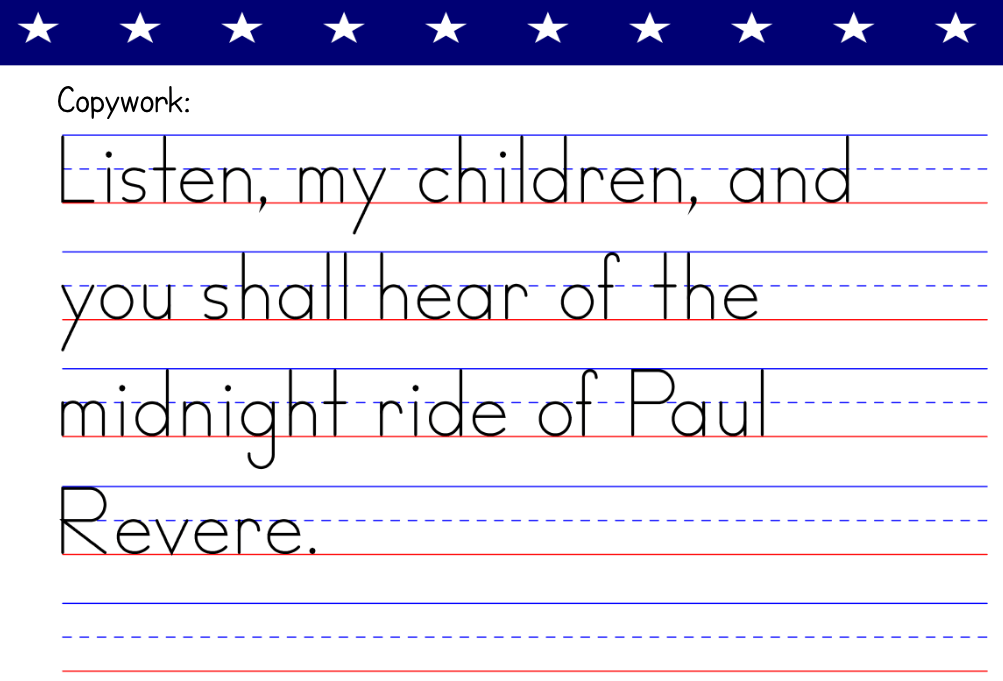
- StartWrite
I use StartWrite to make some of the handwriting copywork that appears in some of the activity books. I guess that’s not technically artwork, but it gets used in some of my page layouts.
- Wacom Cintiq
This is the huge screen I draw on directly. I can’t imagine doing my job without it! I also have a smaller Wacom One that I hook up to my laptop when traveling. - My iPad and Procreate
I love drawing on the iPad with my Apple Pencil. 🙂 Procreate is my fave iPad painting/drawing app.
I spend hours and hours working in the above listed programs to make so many of the Guest Hollow materials and website graphics! I hope you’ve enjoyed this quick behind-the-scenes look at my favorite tools!
Discover more from Guest Hollow
Subscribe to get the latest posts sent to your email.


